Request a Demo of Quagensia T Edition (for TradeStation)

Do you need help determining if our no-code strategy builder for TradeStation® is right for you?

If you would like a demo from a Quagensia® T Edition expert to get your most pressing questions answered and to build a strategy over Google Meet or another video conferencing application, please let us know by emailing your request for a demo to sales [at] quagensia [dot] com.

In your email, please include one or more dates and times between 1:00 PM and 6:00 PM Chicago time (Central Time Zone), Monday-Saturday, for demo start times that are best for you. If we can fit you in at that time, we will let you know; otherwise, we will email you and ask you to pick a different date and time.

If 1:00 PM to 6:00 PM Chicago time simply will not work for you, for instance because it is in the middle of the night in your time zone, we will still likely be able to provide you with a demo at a time that works better for you, although our availability before 1:00 PM Chicago time is much more limited so you will have fewer options of dates and times from which to choose.

The time we have available for demos is relatively limited, so we advise you to come prepared with your specific questions whose answers from us will help you decide if Quagensia T Edition is right for you. To prepare for the demo so that you can maximize your time with our Quagensia T Edition expert, we recommend that you attempt to get your most basic questions answered by watching and following along with some Quagensia T Edition video tutorials, especially the 1-hour 7-minute-long tutorial video titled Create TradeStation® Strategies Using Point-&-Click with Quagensia T Edition – Full Tutorial. You can also get some initial questions answered in the official Quagensia Discord Community. By coming prepared with questions that address your specific needs, you will be able to spend the large majority of your demo ensuring those questions get answered.

We highly recommend taking us up on this offer and are confident you will be very impressed with the capabilities and ease of use of Quagensia T Edition.

Thanks for Sharing!

Ready to get started?

Download the Quagensia no-code strategy builder free trial and build your trading strategies now.

Under a dollar a day.

Priced to be an easy decision for most traders.

Join Us on Discord

Build point-&-click strategies for NinjaTrader® and TradeStation® using Quagensia®. Collaborate with other traders to get and give help, build and backtest strategies together, and grow your skills.

Subscribe to our Newsletter

We'll send you product updates and company news from Quagensia as well as curated lists of Quagensia-enhanced content.

Welcome
Content Creators

Quagensia enables content creators to make interactive content. We invite you to create Quagensia-enhanced content and share it on YouTube and other social media channels. You may submit your high-quality Quagensia-enhanced content for consideration for free inclusion on our website.

Videos for New Users

Videos for Intermediate Users

Screenshots

For larger and additional screenshots, see large Quagensia T Edition screenshots (for TradeStation®).

For additional screenshots, see the list of Strategies Built into Quagensia T Edition (for TradeStation®). Select a built-in strategy that interests you and scroll down for the screenshot. Then scroll up to the top of the page and click the “Overview” link to watch the video on how to use that built-in strategy.

This is a screenshot of the point-and-click trading strategy you will build in Quagensia T Edition (for TradeStation®) if you follow along with the video titled Create TradeStation® Strategies Using Point-&-Click with Quagensia T Edition – Full Tutorial.

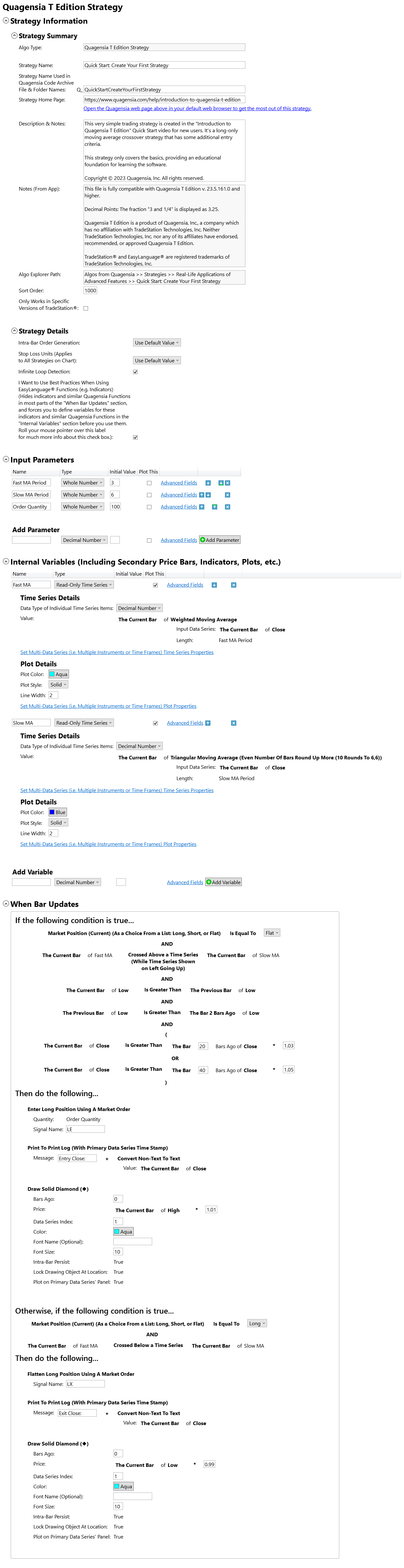
This is a screenshot of the point-and-click trading strategy you will build in Quagensia T Edition (for TradeStation®) if you follow along with the video titled "Introduction to Quagensia T Edition".

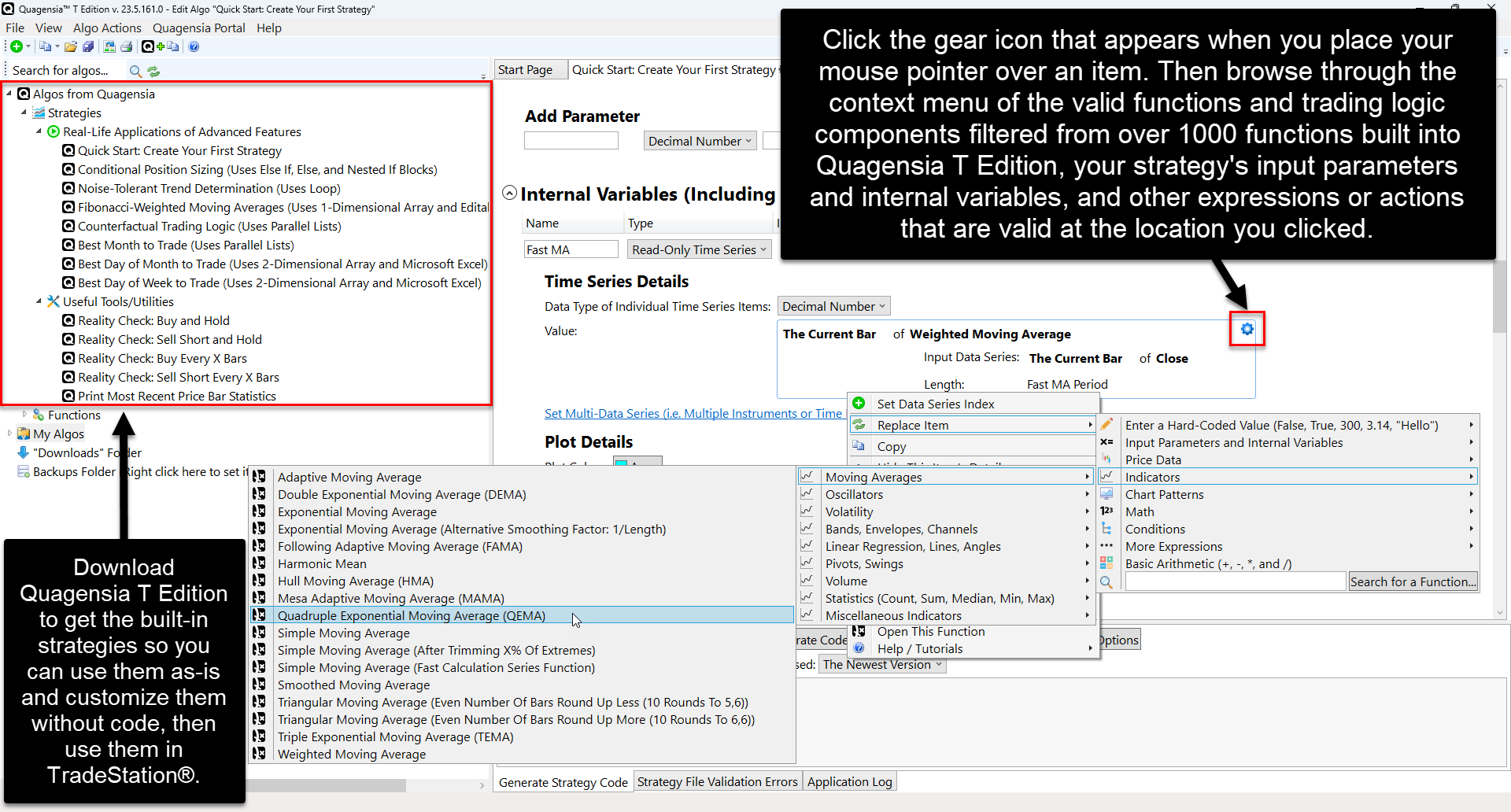
Click the gear icon that appears when you place your mouse pointer over the location to which you would like to add trading logic. A context menu will appear with filtered options to choose from.

Click the gear icon that appears when you place your mouse pointer over the location to which you would like to add trading logic. A context menu will appear with filtered options to choose from.

Thanks for Sharing!

Ready to get started?

Download the Quagensia no-code strategy builder free trial and build your trading strategies now.

Under a dollar a day.

Priced to be an easy decision for most traders.

Join Us on Discord

Build point-&-click strategies for NinjaTrader® and TradeStation® using Quagensia®. Collaborate with other traders to get and give help, build and backtest strategies together, and grow your skills.

Subscribe to our Newsletter

We'll send you product updates and company news from Quagensia as well as curated lists of Quagensia-enhanced content.

Welcome
Content Creators

Quagensia enables content creators to make interactive content. We invite you to create Quagensia-enhanced content and share it on YouTube and other social media channels. You may submit your high-quality Quagensia-enhanced content for consideration for free inclusion on our website.