Ultimate Strategy Template – ExNoBtn (Over 250 Params, Long & Short, Many Money Mgmnt Options) (Complete Example, Can Be Used As-Is) (No Buttons on Chart, Faster Optimizations) (Point-and-Click NinjaTrader® Strategy)

Original Trading Strategy
Peer Reviews, Modifications & Responses
Thanks for Sharing!
Trading Strategy Summary
Introduction to the Quagensia N Edition Ultimate Strategy Templates
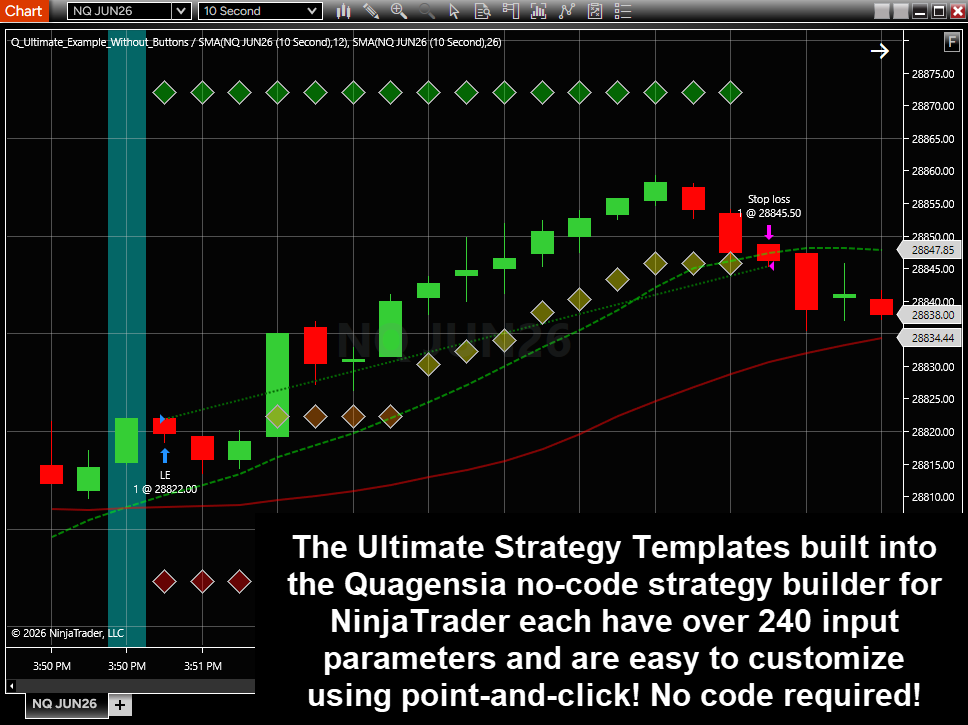
The Quagensia N Edition Ultimate Strategy Templates, of which this strategy is one, are the built-in strategies in Quagensia N Edition with the *most* built-in features, allowing traders to add the absolute minimum of no-code trading logic to create complete strategies that they can back-test, optimize, and trade in live markets in NinjaTrader®. In other words, if you add two features to a copy of one of the Quagensia N Edition Ultimate Strategy Templates, for instance two conditions that must be true for the strategy to enter a long position, the total number of features your strategy will have will be the two you added plus the very large number of features that come built into the Quagensia N Edition Ultimate Strategy Templates by default.
You can make a copy of and make changes to this strategy in order to create your own strategy without having to start from scratch with an entirely new, empty Quagensia N Edition Strategy.
You can easily customize its long and short entry criteria, custom long and short exit criteria, and other parts of its trading logic without code, and use the very large number of features that are built into this strategy already without the need to create your own no-code trading logic by merely changing the values of this strategy’s many built-in input parameters from within the NinjaTrader® user interface.
This strategy has far too many built-in features to describe in this text box, but it does have a very large amount of highly detailed documentation in the “Description” fields of its input parameters, which appear as tooltips in the NinjaTrader® user interface when you place your mouse pointer over the labels next to the input parameters’ editable fields. Note that some of the longest of the input parameters’ “Description” fields are probably too long to read from a tooltip that appears in the NinjaTrader® user interface, and the tooltip won’t have a scroll bar so you will likely be unable to determine if the tooltip displays the entire description. When you see a tooltip that appears that it either is or might be cut off in the NinjaTrader® user interface, you can read the entire description by opening the strategy or your copy of this strategy from which the NinjaScript® strategy in the NinjaTrader® user interface was generated and read the entire description of the input parameter with the same name, and at the same location in the long list of input parameters. This description is hidden by default but can be shown by clicking on the little triangle to the left of the name of the input parameter.
The Quagensia N Edition Ultimate Strategy Templates such as this strategy have disadvantages when compared to the other strategies built into Quagensia N Edition as well, including:
1. The Quagensia N Edition Ultimate Strategy Templates are much larger than other built-in strategies and are therefore slower to work with inside of Quagensia N Edition (for example 1) they open much more slowly in Quagensia N Edition, 2) generating their code takes more time, 3) their undo/redo operations are much slower, and 4) it can take a long time to scroll through all the items in the grids in the Input Parameters and Internal Variables sections and scroll through all the trading logic in the When Bar Updates section), they take more time to compile and be ready for use once they are sent to NinjaTrader®, they are slower to back-test and optimize in the NinjaTrader® Strategy Analyzer, and they require more of a computer’s resources when used in NinjaTrader®. If you need very few of the built-in features of the Quagensia N Edition Ultimate Strategy Templates and know how to build the features you need without code, starting with a copy of another built-in strategy or starting from scratch with an entirely new strategy, you may want to consider creating your own much smaller Quagensia N Edition Strategy to avoid slowness issues due to all the trading logic in the Quagensia N Edition Ultimate Strategy Templates that you don’t need.
2. If your goal is to learn how to build a basic strategy from scratch, component by component in a way where you understand each component in the strategy as you are building the strategy’s trading logic, browsing through the trading logic of the Quagensia N Edition Ultimate Strategy Templates is not a good way to learn how to do this. A better way would be to browse through the trading logic in some of the much simpler strategies built into Quagensia N Edition that are marked as being for new users.
3. While the Quagensia N Edition Ultimate Strategy Templates have the most built-in features, they are also rather rigid in their architecture and so would be hard to modify to accomplish certain types of objectives. Notably, while this strategy handles long, short, and long-short strategies, it does not support scaling into or scaling out of a single long or short position and would be difficult to modify to support scaling in and scaling out of a position. For scaling into or out of a position, it would be easier to start with a copy of one of the other no-code strategies built into Quagensia N Edition, or start from scratch by creating an entirely new Quagensia N Edition Strategy, and building the scale in and scale out trading logic using no-code logic. Also, the money management built into this strategy has specific features that not all traders prefer, such as 1) profit targets are fixed once calculated and cannot “chase” the market, 2) the protective stops (stop losses, breakeven stops, and trailing stops) can only move toward the profitable direction of the position, and 3) the market price that all profit targets and protective stops use as the entry price of a position is based on the first fill price returned for a multi-contract entry order and is not modified as subsequent fills occur in a “split fill” scenario. Furthermore, these strategies or certain features in them may not be suitable for other scenarios as well, such as being used on forex “cross rates” like EUR/JPY whose “Point Value” varies. Furthermore, as with many non-trivial NinjaScript® strategies, some features of this strategy will likely not work properly when run on Renko bars and bars of other bar types that literally go backwards in time and update the price values of previously finished bars; this unrealistic behavior is permitted for bar types whose “IsRemoveLastBarSupported” property is set to true, rather than false as it is for standard time-based price bars, volume bars, range bars, and tick bars. Furthermore, note that while this strategy supports adding one or more secondary data series via one or more “Secondary Price Bar” internal variables, the trading logic in the When Bar Updates section of this strategy will only be executed for the primary data series. In other words, you can add a daily and weekly data series to this strategy and apply the strategy to 5-minute bars in order to be able to use the OHLCV data of the daily and weekly data series from When Bar Updates events called for the 5-minute bar data series, but the trading logic in the When Bar Updates section will not be executed for the daily and weekly data series.
In summary, the Quagensia N Edition Ultimate Strategy Templates may not be suitable for certain situations, but if they are suitable for your needs, they will save you a great deal of time since these strategies have so many features built-in, allowing you to only spend time on your specific entry and exit criteria.
How to Customize This Strategy’s No-Code Trading Logic
Once you’ve made a copy of this strategy, you can automatically scroll to locations within the strategy where you can customize its long and short entry conditions, custom long and short exit conditions, and other parts of its trading logic without code by selecting one of the comments in the “Comment” drop-down list at the top of Quagensia N Edition’s user interface. Doing this will automatically scroll to that “Comment in Code” in the strategy, which will contain additional instructions about how to customize the trading logic directly above or beneath it. We highly recommend that you select comments from the drop-down list that start and end with “☆☆☆” such as the comment in the drop-down list named “☆☆☆ Determine if “User’s Custom Long Entry Filters Are True?” ☆☆☆” since comments that start and end with “☆☆☆” indicate locations in the code that traders can customize most quickly and easily. Most of the other comments start with “Advanced:” to indicate that those locations are meant to be customized only by advanced users of Quagensia N Edition.
Save time by creating your own strategy templates, starting with a copy of this one.
After you use the built-in Quagensia N Edition Ultimate Strategy Templates as starting points for your own strategies for a bit, we recommend that you create your own strategy templates to be more ideal for your specific needs than this strategy template is. You can start with a copy of this strategy template, scroll down to your strategy’s Input Parameters section and change the default values of its input parameters to better fit your personal preferences, and add in your proprietary logic that is common to many of your strategies to create the perfect strategy templates for you, save them to your “My Algos” folder, and make copies of your own proprietary strategy templates as highly customized starting points for your strategies.
This strategy is a complete example you can use as-is, not an empty template.
This strategy is one of the two variants of the Quagensia N Edition Ultimate Strategy Templates that are complete examples that you can use as-is. This means that this strategy comes with pre-built example long and short entry conditions, example indicator internal variables used by the entry conditions, and example input parameters used by the example indicator internal variables.
This strategy or the other complete example strategy might be the best ones to start with because you can open them, send them to NinjaTrader®, and apply them to charts in a Sim account to get a quick idea of how these strategies work without needing to spend the time required to add your own custom entry conditions. Probably the best way to learn about all the features that are built into the Quagensia N Edition Ultimate Strategy Templates is to browse through one of these strategies’ input parameters from within the window in the NinjaTrader® user interface where you apply the strategy to a chart, and place your mouse pointer over the labels next to the input parameters’ editable fields and read the tooltips that appear.
The empty template strategies, on the other hand, are good strategies to make copies of when you want to add your own custom long and short entry conditions because you won’t need to spend time deleting all the sample trading logic that is in this strategy and the other complete example strategy. That said, if your trading logic happens to include moving average cross over and cross under conditions, then you will likely prefer copying this strategy or the other complete example strategy instead because their sample logic happens to use moving average cross over and cross under conditions, and their input parameters include the two moving average periods as well as styling information for the plots of the moving averages.
This strategy does not have a control panel with buttons and editable text boxes.
This strategy is one of the two variants of the Quagensia N Edition Ultimate Strategy Templates that do not add a Control Panel with buttons and editable text boxes to the NinjaTrader® charts to which they are applied.
This strategy’s lack of a Control Panel has the following advantages:
1. No additional installation steps are needed to generate this strategy’s code then send it to and use it from within NinjaTrader®. The two strategies that have a Control Panel require the user to finish the steps of the “Quagensia N Edition Runtime Setup Assistant” that helps users import a NinjaScript® add-on upon which the Control Panel feature relies and obtain the additional license required by the Control Panels feature.
2. No additional licensing is needed to use this strategy within NinjaTrader®. The two strategies that have Control Panels require an additional license to use them within NinjaTrader®. Free trial users that use NinjaTrader® version 8.1.6.2 or above can choose to use “NinjaTrader® Email-Based Licensing” from within the “Quagensia N Edition Runtime Setup Assistant” in order to automatically acquire a temporary free trial license. Free trial users that choose to use “NinjaTrader® Machine ID-Based Licensing” will, however, be required to follow additional steps, and will need to wait for Quagensia technical support to manually set up a license to use the Control Panels feature. If you use NinjaTrader® version 8.1.6.1 or below, you will be required to use “NinjaTrader® Machine ID-Based Licensing”, which takes more time to set up. Since this strategy lacks a Control Panel, it doesn’t need the additional license to use within NinjaTrader®, which can save you time.
3. Back-tests and optimizations in the NinjaTrader® Strategy Analyzer are faster for strategies like this one that lack Control Panels. The additional time shouldn’t be a major problem for a single back-test or an optimization over a relatively small number of combinations of input parameters, but optimizations over a very large number of combinations of input parameters will be somewhat faster, maybe significantly faster, when done for strategies like this one that lack Control Panels.
The only disadvantage of this strategy’s lack of Control Panels is that you will not be able to click buttons on a Control Panel on or near the chart when running this strategy on live or Market Replay market data in order to exert discretionary control over your otherwise fully automated trading strategy.
Note: While this strategy doesn’t have any custom buttons or a custom “Control Panel” like two of the other variants of the Ultimate Strategy Template do, it does have many mentions of such buttons in the descriptions of input parameters and internal variables and in the “Comment in Code” text boxes throughout the strategy. Such mentions of buttons and “Control Panels” do not apply to this strategy. This strategy was created by making a copy of one of the other variants of the Ultimate Strategy Template that do have a Control Panel and then simply deleting the custom buttons and other button-related and “Control Panel”-related input parameters and internal variables. No attempt was made to rewrite the very large amount of descriptive text that mentions buttons and Control Panels.
Information For Advanced Users in Search of a Very Powerful No-Code Strategy Builder That Can Handle Highly Advanced Strategy Logic and Very Large Strategies
All of the Quagensia N Edition Ultimate Strategy Templates, including this one, were created *entirely without any code* in Quagensia N Edition using point-and-click. These strategies use multi-dimensional arrays and many loops in their trading logic, and use other advanced features of Quagensia N Edition as well.
The Quagensia N Edition Ultimate Strategy Templates are also good examples of how it is possible to create strategies without code that have literally hundreds of input parameters and a very large amount of no-code trading logic. They also show how easy it is to navigate between locations in the trading logic of very large strategies by adding “Comment in Code” components to locations in the trading logic and then automatically scrolling to them by selecting the comment in the “Comment” drop-down list at the top of the Quagensia N Edition user interface, and they show how easy it is to automatically scroll to sections, input parameters, internal variables, and function usages by selecting them in their respective drop-down lists at the top of the Quagensia N Edition user interface.
Finally, while this strategy’s many features didn’t require using any of the many no-code subsections in the “When Advanced NinjaScript® Events Occur” section or no-code and plain text code “Other Locations in the Strategy Code File to Paste NinjaScript® Code” section that are located at the bottom of this Quagensia N Edition Strategy if you scroll down to the end of it, they are there when you need them so that you won’t get stuck if you ever need to do something even more advanced.
Copyright © 2026 Quagensia, Inc. All rights reserved.
How to Get the Quagensia Strategies
This point-and-click trading strategy is built into Quagensia N Edition (for NinjaTrader®).
Customize Quagensia Strategies with Your Own Ideas
Tweaking Quagensia Trading Strategies using point-and-click with the Quagensia Desktop Application is easy for non-programmers. If you get stuck you can usually find the answer you need in our online help documentation or you can ask a question in our friendly Discord community.
If you don’t want to tweak a Quagensia Trading Strategy with point-and-click to add your own proprietary trading logic, you can still download a Quagensia Trading Strategy file, open it up in the Quagensia Desktop Application, and generate its code, then backtest and optimize the trading strategy on different instruments, different bar periods (weekly bars, daily bars, hourly bars, 15-minute bars, etc.), or different bar types (time-based bars, volume-based bars, tick-based bars, etc.), and use different start and end dates.
Some tweaks you can make to the Quagensia Trading Strategies you download include:
Modify the entry & exit logic.
- Add more conditions, remove conditions, or change them by choosing from among a very large number of components, including many exotic indicators.
- Add or modify stop losses, trailing stops, and profit targets. Make them tighter, less tight, or based on an entirely different calculation.
- Add or modify time stops. For example, exit after a certain number of bars either unconditionally or only if the post-entry price action did or did not exhibit certain characteristics.
Enhance the output of the strategy to go beyond simply placing orders.
- Draw lines, shapes, and text on the chart. For instance, you can mark times or prices where each entry or exit condition of a multi-condition entry or exit was true, even if all the necessary entry or exit conditions were not true at the same time so an entry or exit did not occur.
- Write information to NinjaTrader®’s NinjaScript® Output window or TradeStation®’s EasyLanguage® Print Log window.
- Write information to a file. You can even output a report that can be opened in Microsoft Excel or consumed by another application that reads comma-delimited, semicolon-delimited, or otherwise character-delimited tabular data files.
Thanks for Sharing!