
Custom VWAP with Resets at Three Times of Day and New Session Highs (Point-and-Click NinjaTrader® Strategy)

Original Trading Strategy
Peer Reviews, Modifications & Responses
Thanks for Sharing!
Trading Strategy Summary
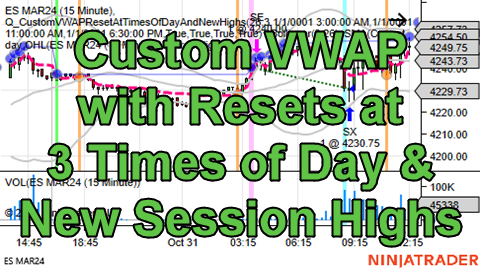
This short-only intraday mean reversion strategy creates and uses a custom resettable VWAP Editable Time Series that can be reset at three different times of day and also if a new session high occurred.
The VWAP is calculated using the “Typical Price” of each bar. The Typical Price of a bar is the average of its High, Low, and Close, which is calculated like this:
(High + Low + Close) / 3
To learn more about the VWAP please see this article at investing.com:
https://www.investing.com/academy/analysis/vwap-formula
This strategy’s trading logic
If the custom resettable VWAP Editable Time Series crosses above the Upper Band of the Bollinger Bands® indicator created using the custom resettable VWAP Editable Time Series as its input time series then enter a short position.
Cover the short position if the custom resettable VWAP Editable Time Series crosses below the Middle Line of the Bollinger Bands® indicator created using the custom resettable VWAP Editable Time Series as its input time series.
Some limitations of this strategy
In order to avoid making this strategy more complex so that it can still serve as a good learning tool for non-advanced users, some logic was left out that reduced the complexity of the finished strategy but that created the following limitations:
Limitation #1: The three times of day that can act as resets of the VWAP when a bar’s end time is greater than or equal to the time of day threshold while the previous bar’s end time is less than the time of day threshold has the limitation that if the previous bar and current bar have end dates that are different because the previous bar closed before midnight but the current bar closed after midnight then that time of day threshold will not work so the VWAP will not be reset.
Limitation #2: The “Calculate” drop-down list in this strategy’s “Strategy Details” section is set to “On Bar Close”. If it is changed to another value like “On Each Tick” or “On Price Change” then the simplifying assumption that a bar is guaranteed to make a new session high if it is the first bar, which is used in the determination of whether or not a bar made a new session high, will return false positives on every tick or price change occurring on the first bar of the session so the VWAP will be reset on every tick or price change occurring on the first bar of the session.
The meanings of the drawings on a chart upon which this strategy is applied
1. The orange vertical lines and orange dots represent the time of day VWAP resets.
2. The lime green vertical lines represent the first bar of a new session.
3. The blue line above the bars shows the current session’s high. Blue dots show new session highs, which also cause VWAP resets.
4. The hot pink dashed line is the custom resettable VWAP Editable Time Series.
5. The gray lines are the three plots of the Bollinger Bands® indicator that is using the custom resettable VWAP Editable Time Series as its input time series.
Techniques used by this strategy
1. Creating a custom Editable Time Series whose custom-calculated values and visual plot behave like an indicator.
2. Using a custom Editable Time Series as the input time series for an indicator such as the Bollinger Bands® indicator.
3. Creating a custom VWAP that resets back to the “Typical Price” of the current bar instead of a volume-weighted moving average of the Typical Price values of all the bars since the last reset, based on time-based reset conditions and a price-based reset condition. Once you understand how to build a resettable indicator calculation, you can store it and plot it in an Editable Time Series to create Editable Time Series that act like indicators whose “calculation window” or “Period” are *variable*, such as a Period equal to “the number of bars since the last reset, whatever that number may be”, not a fixed, constant number like “14” as is typical for indicators like a “14-Period Simple Moving Average”.
4. Simplifying complex sets of conditions by setting Boolean (True or False) internal variables to a subset of a complex set of conditions with ANDs, ORs, and parentheses, then using the Boolean (True or False) internal variable in a simple condition that checks if the Boolean (True or False) internal variable is set to True or False.
5. Toggling the visibility of an indicator based on if an input parameter’s checkbox is checked in the NinjaTrader® user interface by setting the indicator’s internal variable’s “Condition That If False Will Cause Plot to Not Be Plotted” to a condition that checks if the input parameter represented by a checkbox is True or False.
6. How to plot only one plot of a multi-plot indicator by creating and plotting a 1-Period Simple Moving Average on one of the plots of the multi-plot indicator.
7. Drawing little shapes and vertical lines on a chart using translucent (i.e. semi-transparent) colors so that the bars on the chart with the drawings on top of them are still visible underneath the translucent shapes and lines.
8. Protecting against “divide by zero” errors by using an alternative calculation for the VWAP (specifically the Typical Price of the bar) in the unusual case where the total volume, which goes in the denominator of a quotient (i.e. a division operation), may be 0 due to an unforeseen issue.
Copyright © 2024 Quagensia, Inc. All rights reserved.
How to Get the Quagensia Strategies
This point-and-click trading strategy is built into Quagensia N Edition (for NinjaTrader®).
Customize Quagensia Strategies with Your Own Ideas
Tweaking Quagensia Trading Strategies using point-and-click with the Quagensia Desktop Application is easy for non-programmers. If you get stuck you can usually find the answer you need in our online help documentation or you can ask a question in our friendly Discord community.
If you don’t want to tweak a Quagensia Trading Strategy with point-and-click to add your own proprietary trading logic, you can still download a Quagensia Trading Strategy file, open it up in the Quagensia Desktop Application, and generate its code, then backtest and optimize the trading strategy on different instruments, different bar periods (weekly bars, daily bars, hourly bars, 15-minute bars, etc.), or different bar types (time-based bars, volume-based bars, tick-based bars, etc.), and use different start and end dates.
Some tweaks you can make to the Quagensia Trading Strategies you download include:
Modify the entry & exit logic.
- Add more conditions, remove conditions, or change them by choosing from among a very large number of components, including many exotic indicators.
- Add or modify stop losses, trailing stops, and profit targets. Make them tighter, less tight, or based on an entirely different calculation.
- Add or modify time stops. For example, exit after a certain number of bars either unconditionally or only if the post-entry price action did or did not exhibit certain characteristics.
Enhance the output of the strategy to go beyond simply placing orders.
- Draw lines, shapes, and text on the chart. For instance, you can mark times or prices where each entry or exit condition of a multi-condition entry or exit was true, even if all the necessary entry or exit conditions were not true at the same time so an entry or exit did not occur.
- Write information to NinjaTrader®’s NinjaScript® Output window or TradeStation®’s EasyLanguage® Print Log window.
- Write information to a file. You can even output a report that can be opened in Microsoft Excel or consumed by another application that reads comma-delimited, semicolon-delimited, or otherwise character-delimited tabular data files.
Thanks for Sharing!









