Create No-Code TradeStation® Strategies with These 170 No-Code Indicators and Chart Patterns Built into Quagensia T Edition

Welcome to the complete list of over 170 no-code indicator and chart pattern functions that you can use to create TradeStation® strategies using point-and-click with Quagensia T Edition.

Quagensia® T Edition (For TradeStation®) has over 170 no-code indicator and chart pattern functions that enable you to plot the values returned by TradeStation® indicator functions on the chart to which your strategy is attached, allow your strategy’s logic to access the numeric values returned by the TradeStation® indicator functions for both the current bar and previous bars, and allow your strategy’s logic to determine if certain chart patterns occurred ending with either the current bar or previous bars.

These no-code functions are listed below with links to their help pages. Each function is displayed in the same subfolder in which you can find it in Quagensia T Edition’s Algo Explorer and in the context menu that appears when you click on a location on your Quagensia Algo’s workspace where the function is allowed to be used.

Note that if Quagensia T Edition is missing an indicator function for a TradeStation® indicator function to which you have access from within your installation of the TradeStation® platform, you can add it to Quagensia the easy way by copying one of the over 170 built-in Quagensia T Edition Functions listed below and making small changes to match your indicator’s name, input parameters, and other attributes.

No-Code Indicator and Chart Pattern Functions Built into Quagensia T Edition (For TradeStation®)

Submit your high-quality Quagensia tutorials for consideration for free inclusion on our website.

If you publish high-quality Quagensia tutorials on a social media platform like YouTube, please consider submitting them to us. We may promote them for free by linking to them from relevant pages on our website.

To submit your Quagensia tutorials for consideration for free inclusion on our website, use the How to Submit Your Quagensia-Enhanced Content page. We are available by phone or email to help you create, publish, and promote Quagensia-enhanced content. You can also get questions answered in our Content Creator Support Center and in the official Quagensia® Discord community’s content-creators channel.

Thanks for Sharing!

Ready to get started?

Download the Quagensia no-code strategy builder free trial and build your trading strategies now.

Under a dollar a day.

Priced to be an easy decision for most traders.

Join Us on Discord

Build point-&-click strategies for NinjaTrader® and TradeStation® using Quagensia®. Collaborate with other traders to get and give help, build and backtest strategies together, and grow your skills.

Subscribe to our Newsletter

We'll send you product updates and company news from Quagensia as well as curated lists of Quagensia-enhanced content.

Welcome
Content Creators

Quagensia enables content creators to make interactive content. We invite you to create Quagensia-enhanced content and share it on YouTube and other social media channels. You may submit your high-quality Quagensia-enhanced content for consideration for free inclusion on our website.

Videos for New Users

Videos for Intermediate Users

Screenshots

For larger and additional screenshots, see large Quagensia T Edition screenshots (for TradeStation®).

For additional screenshots, see the list of Strategies Built into Quagensia T Edition (for TradeStation®). Select a built-in strategy that interests you and scroll down for the screenshot. Then scroll up to the top of the page and click the “Overview” link to watch the video on how to use that built-in strategy.

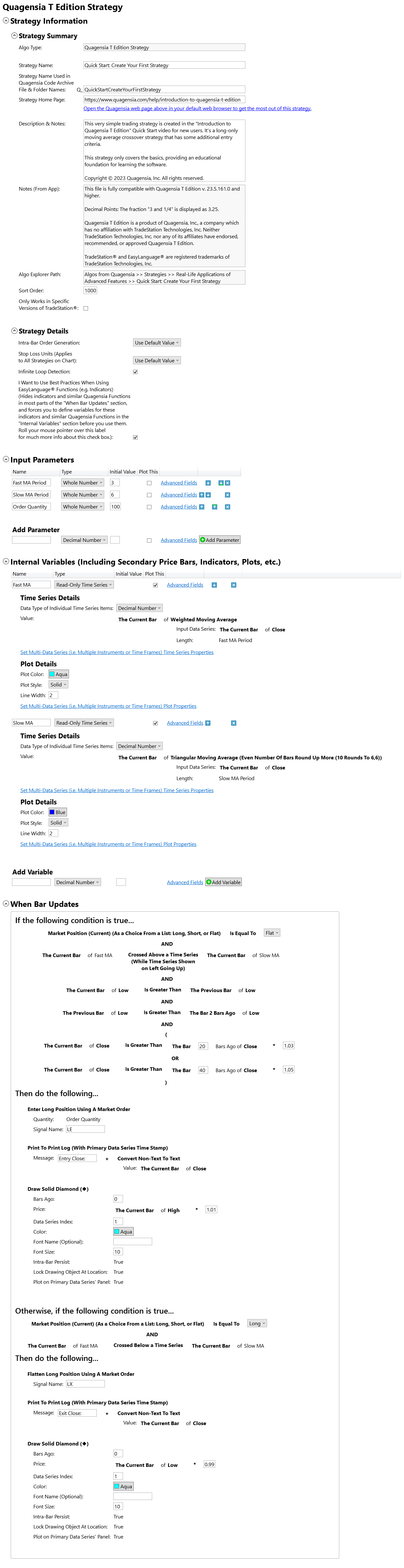
This is a screenshot of the point-and-click trading strategy you will build in Quagensia T Edition (for TradeStation®) if you follow along with the video titled Create TradeStation® Strategies Using Point-&-Click with Quagensia T Edition – Full Tutorial.

This is a screenshot of the point-and-click trading strategy you will build in Quagensia T Edition (for TradeStation®) if you follow along with the video titled "Introduction to Quagensia T Edition".

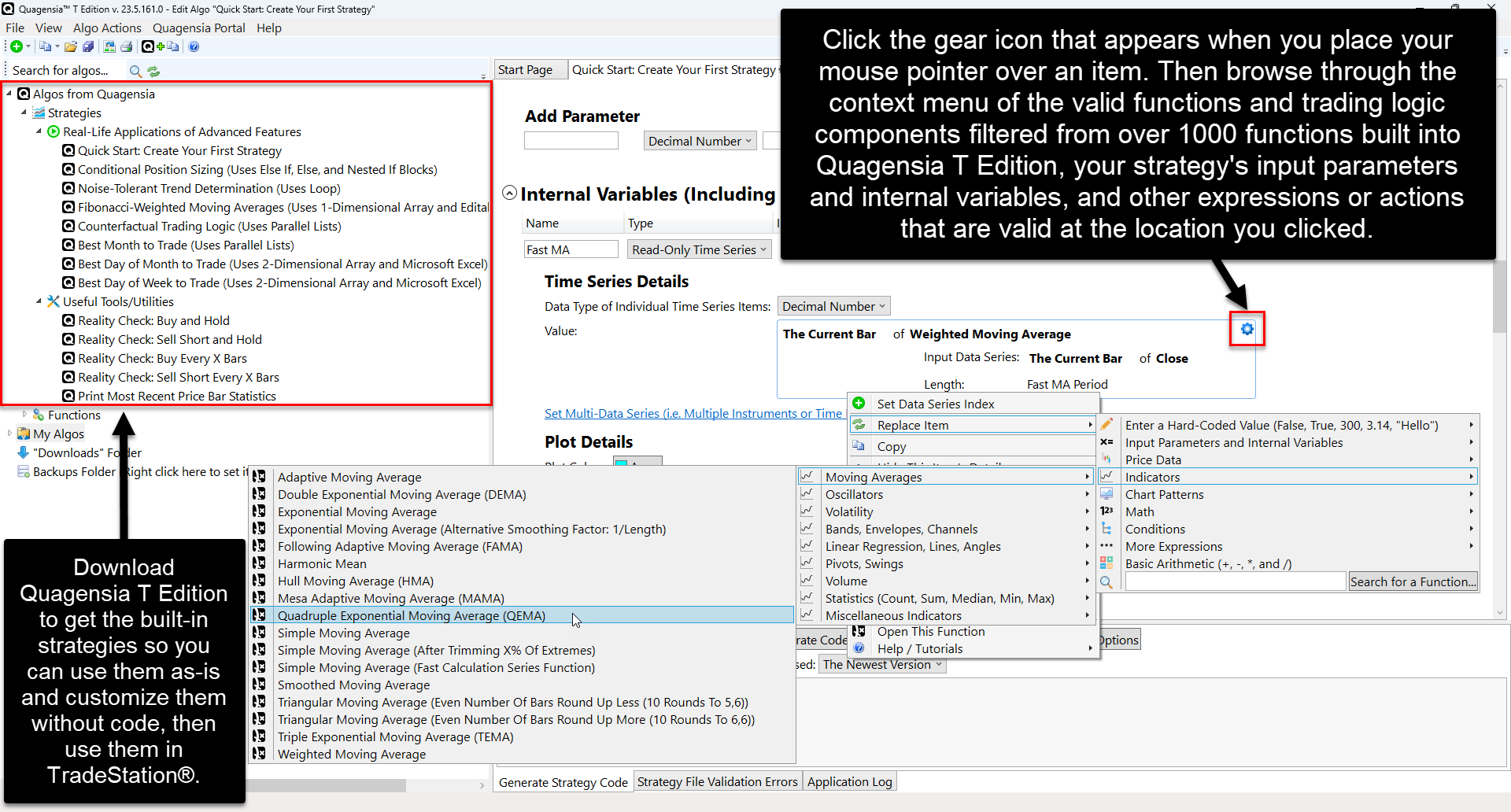
Click the gear icon that appears when you place your mouse pointer over the location to which you would like to add trading logic. A context menu will appear with filtered options to choose from.

Click the gear icon that appears when you place your mouse pointer over the location to which you would like to add trading logic. A context menu will appear with filtered options to choose from.

Thanks for Sharing!

Ready to get started?

Download the Quagensia no-code strategy builder free trial and build your trading strategies now.

Under a dollar a day.

Priced to be an easy decision for most traders.

Join Us on Discord

Build point-&-click strategies for NinjaTrader® and TradeStation® using Quagensia®. Collaborate with other traders to get and give help, build and backtest strategies together, and grow your skills.

Subscribe to our Newsletter

We'll send you product updates and company news from Quagensia as well as curated lists of Quagensia-enhanced content.

Welcome
Content Creators

Quagensia enables content creators to make interactive content. We invite you to create Quagensia-enhanced content and share it on YouTube and other social media channels. You may submit your high-quality Quagensia-enhanced content for consideration for free inclusion on our website.